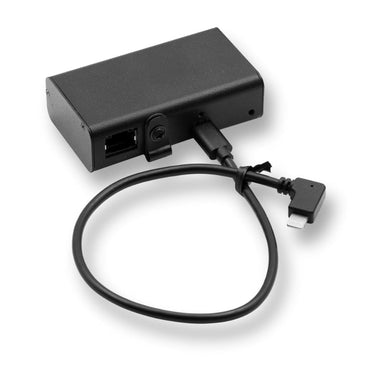

Extend PoE+ (802.3at) Power and Data to PoE (802.3af) with a 12 Volt DC Output
Send PoE+ (802.3at) to 330 ft, then extend PoE (802.3af) another 330 ft with separate 12 volt DC output. Power 12 volt devices like Single Board Co...
View full details
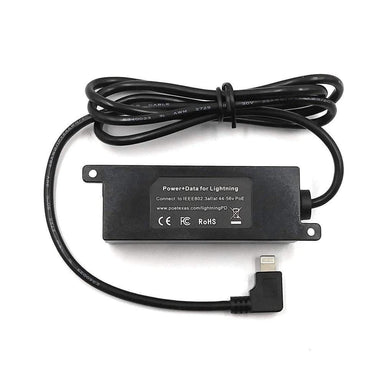
Power Two Devices From One ConnectionA PoE+ switch port can deliver up to 25.5W of power to a connected powered device. But in installations where multiple devices share the same location, dedicating a separate port and cable run to each one isn't always the most efficient approach. Consider a security installation with an existing 12V camera and a newer PoE-powered network device. Both need power, both occupy the same area, but they don't use the same power standard.
The PoE Texas GAT-AF-12V12W offers another option. Using one IEEE 802.3at PoE+ input, it provides two independent outputs: 12V DC power for compatible non-PoE equipment and a separate IEEE 802.3af PoE connection for another powered device. Instead of treating each device as a separate installation, you can distribute power to both from a single PoE+ connection.
The GAT-AF-12V12W takes an incoming PoE+ connection and distributes its available power across two outputs:
• 12V DC output: Delivers up to 12W of continuous power for compatible non-PoE equipment.
• 802.3af PoE output: Supplies up to 12.95W to a second PoE-powered device.

Together, the outputs provide up to 24.95W of combined power, within the 25.5W available from a standard IEEE 802.3at PoE+ port at the powered-device end.
This configuration makes better use of an existing network connection. Rather than running separate infrastructure for each device, installers can power compatible equipment with different power requirements from one PoE+ connection.
The important consideration is the combined power budget. Each connected device must stay within its respective output limit, and the upstream PoE+ source must have sufficient available power.
Network upgrades don't always happen all at once. Existing installations may include reliable 12V equipment that still meets operational requirements, alongside newer devices designed for PoE. Replacing functional hardware simply to standardize power requirements can increase project costs. Installing separate power supplies for legacy equipment can also introduce additional wiring and maintenance points.
The GAT-AF-12V12W allows both types of equipment to operate within the same installation. Its 12V DC output supports compatible non-PoE devices, while its separate 802.3af output powers another PoE device.
This is particularly useful in:
• Security retrofits: Retain a compatible 12V camera while adding a new 802.3af-powered device at the same location.
• Edge computing: Supply 12V DC power to a compatible single-board computer while powering a separate PoE network device.
• Digital signage: Power a compatible 12V media player alongside another PoE-powered device at a display location.
• Automation and control: Support compatible 12V controllers and PoE equipment installed within the same enclosure or equipment area.
For system integrators, this means more flexibility when combining existing infrastructure with newer network equipment. You can upgrade individual components without necessarily replacing the entire installation.
When an installation requires both 12V DC and PoE power, you don't necessarily need separate power infrastructure for every device. The PoE Texas GAT-AF-12V12W combines two power outputs in one compact solution, helping installers support mixed-device deployments, retain compatible existing equipment, and extend network connectivity.
Explore the GAT-AF-12V12W and see how it can simplify your next network deployment.
Save Liquid error (snippets/product-badge line 32): Computation results in '-Infinity'%
Send PoE+ (802.3at) to 330 ft, then extend PoE (802.3af) another 330 ft with separate 12 volt DC output. Power 12 volt devices like Single Board Co...
View full details
Save 0%
Perfect for conference rooms, kiosks, and anywhere else you need a digital display. You can now use one Ethernet cable to extend power and data to ...
View full details
Save 0%
Gigabit, Mode A/B Inline PoE Splitter for 5 Volt Devices like Sonoff PTZ Cameras, Media Players, and Set Top Boxes The GAF-5v splitter works with ...
View full details
Save Liquid error (snippets/product-badge line 32): Computation results in '-Infinity'%
Use with one of our ModeA/Mode B PoE injectors to utilize all 4 wire pairs for additional power per port via Ethernet. Or use to connect two device...
View full details
Save Liquid error (snippets/product-badge line 32): Computation results in '-Infinity'%
Gigabit, Mode A/B Inline PoE Splitter OEM Board for 5 Volt Devices like Sonoff PTZ Cameras, Media Players, and Set Top Boxes the AF-5v10w-OEM gives...
View full details
Save 30%
Use this adapter with the GAF-5v10w and POE-5v10w splitters to extend power by 11.4 feet (3.5 meters) allowing the splitter to be mounted in ceilin...
View full details
Save Liquid error (snippets/product-badge line 32): Computation results in '-Infinity'%
Intuitive, Highly Visible PoE Control at Your Fingertips Power up to four IEEE 802.3at standard IP cameras, desktop phones, WiFi access points, or ...
View full details
Save Liquid error (snippets/product-badge line 32): Computation results in '-Infinity'%
Use this adapter with a POE+ splitter to power Microsoft Surface Pro tablets. Product Specifications: 2.1 x 5.5 mm male DC adapter to Microsoft po...
View full details
Save Liquid error (snippets/product-badge line 32): Computation results in '-Infinity'%
Product Use: Pair with our GAF-5v10w or POE-5v10w Splitters to power 5v USB devices like Apple iPad and more. Features: Female USB-A will fit any ...
View full details
Save -8%
Perfect for conference rooms, kiosks, and anywhere else you need a digital display. You can now use one Ethernet cable to extend power and data to ...
View full details
Sold out
Intuitive, Highly Visible PoE Control at Your Fingertips Power up to four IEEE 802.3at standard IP cameras, desktop phones, WiFi access points, or ...
View full details
Please Wait...